Golf Simulator Projector Calculator
A projector fits your room only if its throw ratio puts the lens in the right place: close enough to fill your image, and in front of your swing so your body does not block the picture. Enter your image width and a throw class, or your own projector's ratio, and get the mounting distance and the shadow verdict together.
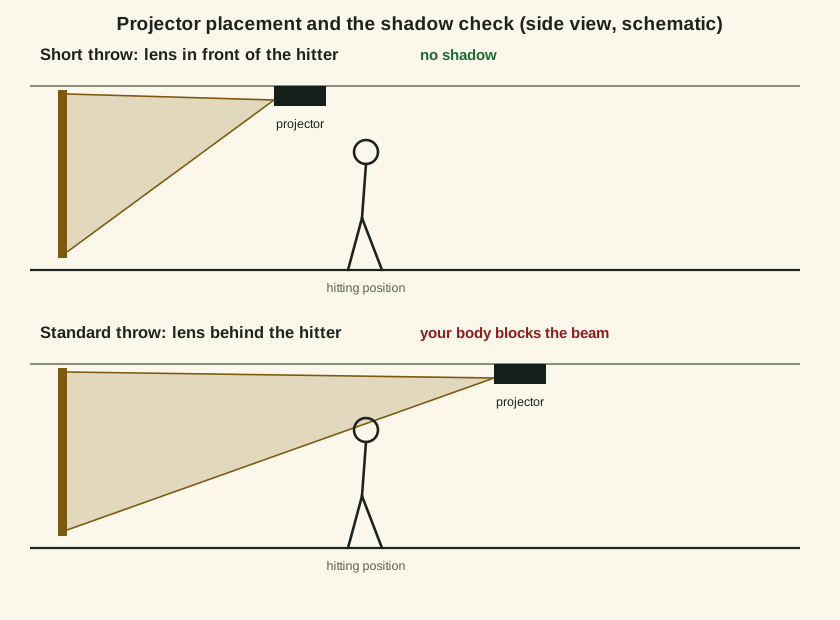
How throw distance and the shadow check work
Throw ratio is throw distance divided by image width (BenQ's definition, used by every maker), so distance is ratio times width. A zoom lens gives a range, and the tool returns both ends. The shadow check compares that distance with where you stand: if the lens sits farther from the screen than your ball position plus about a foot, you are between the projector and the screen, and your shadow lands in the image on every swing. That is why simulator rooms use short throw projectors: a BenQ TK710STi class lens (0.69 to 0.83) fills a 13 ft image from 9 to 10.8 feet, in front of a hitter standing 10 feet out.
Worked examples
Short throw, 13 ft image
Ratio 0.69 to 0.83, hitting from 10 ft.
Mount 8.97 to 10.79 ft from the screen, no shadow problem
Standard throw, same image
Ratio 1.08, hitting from 10 ft.
14.04 ft from the screen: behind you, shadow warning fires
Ultra short throw
Ratio 0.35 to 0.50, 13 ft image.
4.55 to 6.5 ft: the lens sits over the screen end of the bay, never in your swing
Frequently asked questions
What throw ratio do I need for a golf simulator?
Can I just move a standard projector closer?
Does the shadow check apply to a floor-mounted projector?
Related tools
Golf Simulator Room Size Calculator
Enter your room and get a fit verdict per launch monitor type: radar behind the ball, camera beside it, or overhead, with the limiting dimension named.
Golf Simulator Screen Size Calculator
From your usable wall and aspect ratio, the largest image that fits, its diagonal, and the standard screen class it maps to.
Golf Simulator Cost Calculator
Component tiers in, a total cost band out: monitor, screen, projector, mat, computer and software, itemised.
Launch Monitor Finder
Your space, use, handedness, budget and data priorities matched to the monitor class that fits, with the ruled-out classes explained.
Disclaimer: Estimate only. Verdicts follow the manufacturers' published setup figures; test-swing in the room before you buy anything.
Use this tool on your own site
Free to embed. Paste this code where you want the tool to appear. It carries a small credit link, which is all we ask.